Help / Product guides / Purchasing / Receivals
Receivals
Record stock as it arrives, with or without a purchase.
Last updated
Receive against a purchase
Open the purchase and choose Receive stock. If your company tracks best-before dates, the action is called Set best before instead.
- For each line, enter the quantity received. The Required badge shows how many were ordered.
- Enter the best-before date. Use + to split a line across more than one best-before date.
- Change the cost if the supplier charged a different amount.
- Save.
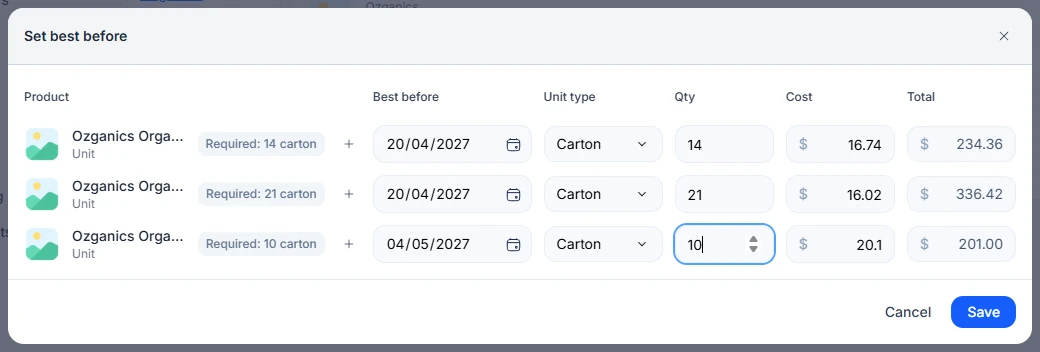
You can receive part of a purchase and come back for the rest. Quantities already received are filled in next time.
Receive without a purchase
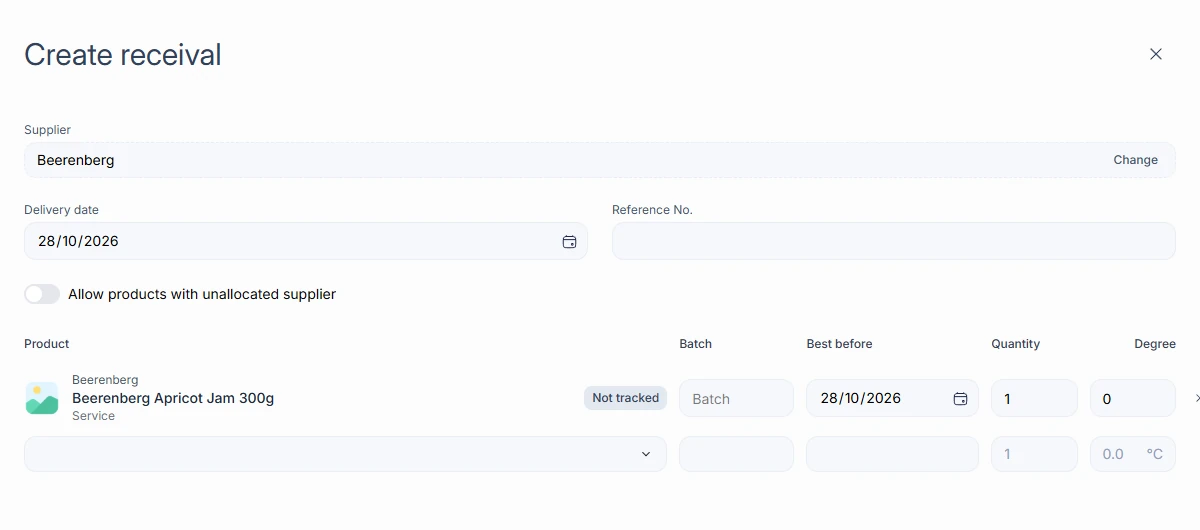
If a delivery arrives with no purchase raised, open Purchases, open the drop-down on Create purchase, and choose Manual entry. This opens Create receival.
- Choose the Supplier and Delivery date, and add a Reference No.
- Turn on Allow products with unallocated supplier if you need products not linked to that supplier.
- For each product, enter the Batch, Best before, Quantity, and temperature in °C.
- Save.