
Help / Product guides / Sales / Quotes
Quotes
Agreed prices for chosen customers, applied on their sales.
Last updated
What a quote is
A quote in Zami is a set of agreed prices for one or more customers. It is used on their sales, either by picking it in the Quotes field or automatically with Auto apply. The sale then shows Quote price applied.
Create a quote
Open Quotes under Customers and choose Create quote.
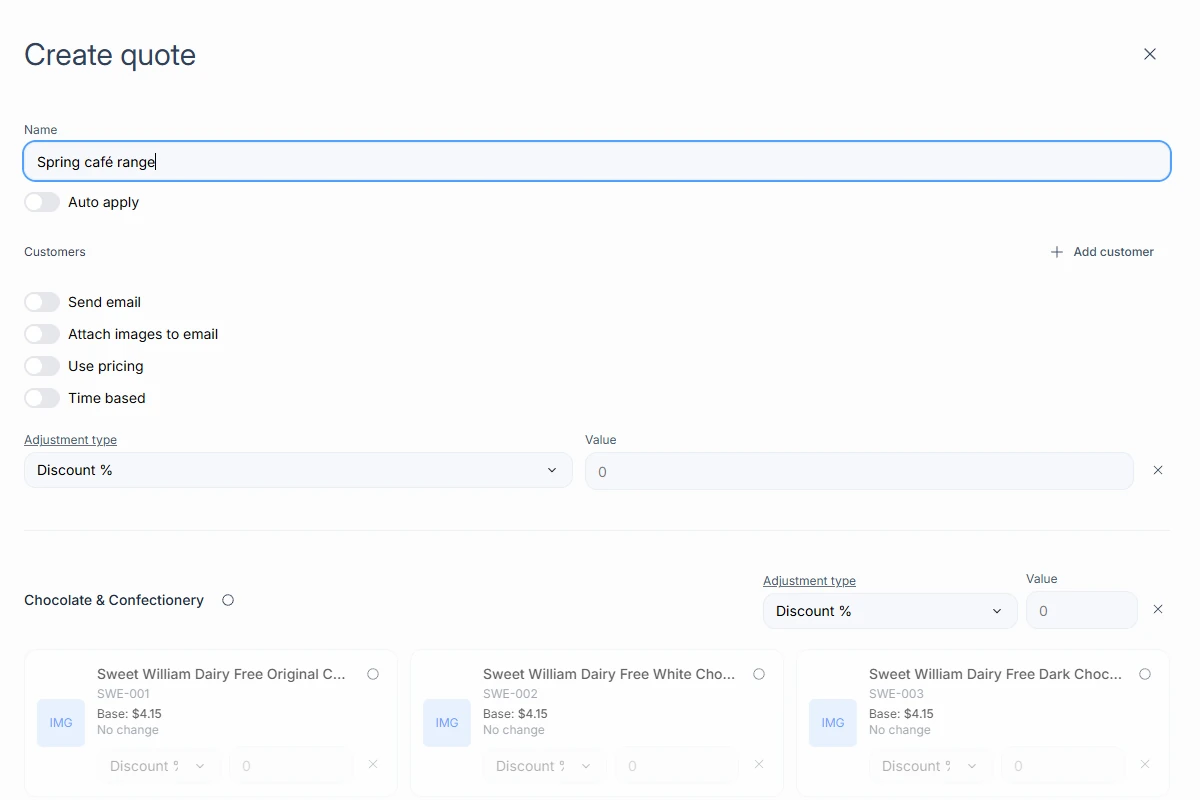
- Enter a Name and choose Add customer for each customer it applies to.
- Select categories and products, and set an Adjustment type and Value for each.
- Optionally turn on Use pricing to start from a pricing group, Time based to set a Start date and End date, and Auto apply.
- Turn on Send email to email the quote to its customers, and Attach images to email to include product images.
- Save.
Manage quotes
Open a quote to Send to customer, Download the PDF, Duplicate it, or Create pricing to turn it into a pricing group. A quote is Active or Disabled. Use Disable to stop it applying, and Delete once it is disabled.